 NEW Firefox 2.0 released - Download Now!


Saturday, October 14, 2006
Yahoo!Widget
Actually, i'm really doesn't know what is WIDGET. Then I'm doing some searching and rear about it. Even I'm already download Yahoo!Widget to test and feel it. So, for me It's look awesome and very interactive especially it append to my desktop. But its very consume my memory especially when you put a lot of widget at your desktop. If you want to know what is Windows Vista is like, so you can donwload Yahoo!Widget. The Yahoo! Widget Engine (formerly known as Konfabulator) is a JavaScript runtime engine for Windows and Mac OS X that lets you run little files called Widgets that can do pretty much whatever you want them to. Widgets can be alarm clocks, calculators, can tell you your WiFi signal strength, will fetch the latest stock quotes for your preferred symbols, and even give your current local weather. What sets Yahoo! Widget Engine apart from other scripting applications is that it takes full advantage of today's advanced graphics. This allows Widgets to blend fluidly into your desktop without the constraints of traditional window borders. Toss in some sliding and fading, and these little guys are right at home in Windows XP and Mac OS X. The format for these Widgets is completely open and easy to learn so creating your own Widgets is an extremely easy task. For the "skinning" crowd, Yahoo! Widget Engine is a dream come true. You can easily change the look, feel, layout, even functionality of a Widget so that it matches your lifestyle, your desktop, or the pants or skirt you have on that day. Some time in early 2000 Arlo Rose came up with an idea for a cool little application. It would use XML to structure images, and a scriptable language, like Perl, in such a way that someone who knew the basics of Perl could put together cool little mini-applications. The goal was that these mini-applications would just sit around on your desktop looking pretty, while providing useful feedback. All he ever really wanted was to have a cool looking battery monitor and something that told him the weather, but he knew the possibilities for something like this could potentially be limitless. Fast forward a couple of years when Arlo began working with Perry Clarke at Sun Microsystems. Over lunch one afternoon Arlo gave Perry the basics of this dream app. Perry suggested that JavaScript would be far easier for people to digest. He was right. It's the basis for Flash's ActionScript, and Adobe's scripting engine for Photoshop. Of all the choices, JavaScript made the most sense. Shortly after that lunch, the two began to spend their nights and weekends making this thing a reality. A half year later it was ready for download on Mac OS X. Time flew by, Ed Voas joined the team and the Windows version was unveiled.
=========What Is the Yahoo! Widget Engine?
A Little History...

Labels: Technologies
[ Read More ]
Saturday, October 07, 2006
Windows VISTA
Microsoft launched new OS namely VISTA. Windows VISTA Release Candidate 1 is available to try. Windows Vista introduces breakthrough computing experiences that are both visually exciting and intuitively designed, and will positively change the ways in which you use your PC. With the new desktop experience, you can more efficiently organize and find your information. You can "see" your files and applications in a way that makes sense to you so you can confidently focus on what you want to accomplish.""We live in an age where nearly everything is digital—the documents you create, the photos you take, and the music and videos that you enjoy on your PC. Even your daily correspondence with others through e-mail, faxes, and voice mail is digital. Your life is connected to the digital files stored on your PC.
 Use Flip 3D to navigate through open windows using the scroll wheel on your mouse.


 See thumbnail views of the items in your taskbar by resting your mouse pointer on them.
 Use Instant Search to quickly find the information you need.
 The new Document Explorer makes working with your files a snap. Find your files more quickly with the new Live Icon feature, and see what they contain without having to open them.
 Use Flip to view and navigate more easily through open windows.
Labels: Technologies
[ Read More ]
Monday, July 24, 2006
Windows Genuine
I'm sure that everybody in the world face this problem especially for whom use illegal Windows XP. My suggestion better you get a legal XP and you no need to face this problem after this or maybe other issues that with arises after this.
What i want to give here is not a support for "illegal software" but some knowledge how to manipulate your OS especially Wondows XP.
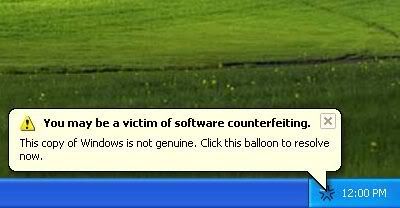
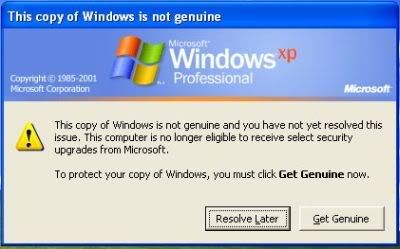
To add to the shareware ‘look and feel’, a balloon popup will appear randomly when you use the computer, reminding the user that they may be a victim of (pirated) Microsoft Windows product.
However the windows tattoo is not without a flaw, few websites including The Inquirer has published ways to circumvent the Windows Genuine Advantage check by tampering with windows registry.
Presented here is an alternative way to remove those annoying popup
- Go to C:\Documents and Settings\All Users\Application Data\Windows Genuine Advantage\data
- go to Tools->Folder Option->View, select “Show Hidden Files and Folders”
- Uncheck “Hide Protected Operating System Files”, then click OK
- Delete everything in that folder
- Mark that folder as “Read-Only”, then you’re done!
The annoying windows popup won’t appear anymore! Simple solution without having to temper with Windows Registry.
Update - You can download WGAfakap
You can download an application that will automatically remove the annoying Windows Genuine Advantage Notification.
Source : mypapit gnu/linux blog
Labels: Technologies
[ Read More ]
